Der Schmale – David Lenaerts’s blog

Flash Platform Experiments

Fresnel reflective shading with Away3D

Tags: , , , , , , , , ,

fresnel-awayFinally, something new! But no, it’s not any of the bigger things I’ve been hinting at before. However, I’ve been hard at work at those (and other) projects for months, and ended up with tunnel vision and an annoying rut. I really needed to do something smaller again for some immediate visual fun. When Bartek showed me something on Twitter, I decided to take a step back from all the work, dig up some half-year old code and finish it asap. And so I did: that is a Fresnel Pixel Bender shader for Away3D, presented in the FresnelPBMaterial!

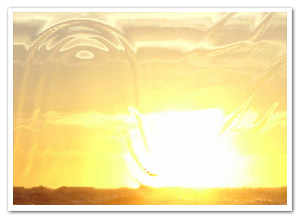
I’ve explained it before, but I’ll give a more general explanation this time around. Fresnel shading mimics the way light reflects off of (often translucent) surfaces such as water or glass. Looking head-on, you can see its proper surface (or see through it with refraction). However, if seen from a shallow angle, it reflects light (just imagine looking over a large body of water, or the mirage effect on the road on hot summer days).

Demos

I’ve thrown together some rather random demos to illustrate the point. There’s source for both. (A word of warning: apparently, on some FP10.1 betas, Pixel Bender causes it to throw an invalid input exception, which seems to be bogus.)

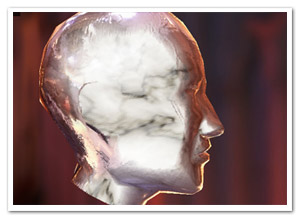
  • Glass and marble head: Yes, the head appears to be floating in the middle of a cathedral of some blurry sort. Click to cycle through different property settings: glass, alien marble (I’m sure that’s a thing), and plain marble.
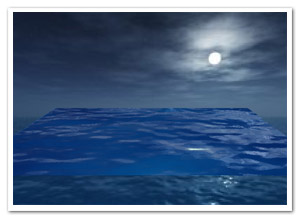
  • Water surface: Using an animated normal map to illustrate how water could be rendered while using the fake refraction. It also shows the WaterMap util.

Another word of warning: slight implementation details might change in the next few days/weeks, but it should be nothing too dramatic!

I’ll probably be doing something more with this when I have the time, but nothing that would likely make it to the repository :-)

Leave a comment (9 comments)

More Stok3d: Parallax mapping & Water shading

Tags: , , , , , , , , ,

waterToday’s update on Stok3d is perhaps not as useful as the previous post, but I certainly had fun working on it. Or as we say in Dutch with a word blatantly stolen from German: it’s “spielerei”.

Demos:

I’m going to post the demos first this time. Saves you some scrolling effort, because the explanations below are rather boring ;)

  • Parallax Mapping : Move and turn towards the edges of the screen to see the extrusion of the texture best. A PhongFilter is added as a second filter, making it slower but the effect becomes more obvious.
  • Water Shading 1 – Ocean : Reflects or refracts light depending on the view angle and the surface relief. It animates a perlin noise filter to generate a water heightmap.
  • Water Shading 2 – Ripples : Same thing, but with a simple drawn ripple effect. The difference between refracted and reflected light is more obvious here.

Edit: Even if you have Flash Player 10, you still might get an update request. That is because these demos require the version of 10.0.22 concerning recent Pixel Bender bugfixes.

The source code for these demos can also be found on Google Code.

Useful updates

Some updates I did involved some bugfixes and performance-related updates. I also added a NormalMapUtil class, which provides a basic API to generate and manipulate normal maps. The main features are the generateFromHeightmap and drawFromHeightmap methods. Since height maps (or bump maps) are generally easier to come by (and to make), these methods generate a normal map for you. generateFromHeightMap creates a new BitmapData, drawFromHeightMap uses an existing BitmapData that you provide (useful if you need to generate one on every frame). The NormalMapUtil class furthermore allows you to invert the components of the normals, in case a normal map reflects the light in the wrong directions.

Water Shading

A new shader filter that was added is the WaterShadingFilter. If you remember your high school physics, depending on the view angle, the surface either reflects the light or lets it pass through and refracts it (which is called the fresnel effect).  To put it simply, when looking at water at a shallow angle, it seems like a very reflective surface, but when looking straight down into it, you can see through it but it’s a distorted view. The reflection uses a combination of environment mapping and phong shading, while the refraction is a simple displacement mapping technique. The DisplayObject to which the filter is applied is used as what’s underneath the surface, ie: the refracted light. The ripples seen in the demo are not made by the filter, but are custom written to manipulate the normal map.

Parallax Mapping

Another new filter is the ParallaxFilter, which performs (you guessed it) parallax mapping. It’s a technique like bump and normal mapping, in the sense that it tries to give more depth to a 2D texture. It does so by displacing texture coordinates based on a height map and view direction to the coordinate that it would normally have in 3D space. This causes the texture to look extruded and more detailed. For more (and better) information, check the article on wikipedia. Stok3d implements an iterative variation. It’s a bit slower but takes care of overlap issues and can handle sharp edges.

That’s it! For now, it’s back to Farbe, and… some other things :)

Leave a comment (15 comments)

Return of the ripples! Shallow water simulation with Pixel Bender.

Tags: , , , , , , , ,

shallowwater

When looking at my blog stats, the most popular post by far is the old Ripple effect I did some time ago, which was based on an old demoscene trick. For a while, I’ve wanted to do a more physically correct version based on shallow water equations. Since the watercolour effect I did was based on a similar variation (as well as the image bleeding in the previous post), I decided to throw together a quick test to see if it could be turned into a new iteration of the old ripple effect. It’s mainly done for sake of experimentation, and if you really want a ripple effect I suggest using the prior one. Although the dynamics are more interesting, this one is slower, but I’m pretty happy with the performance considering the amount of calculations and the grid size (the demo has a grid of 200×200).

  • Demo
  • Source – There’s a few parameters to play around with, but take care: the simulation might just blow up with extreme settings ;)

Some day I might try out a sim with the real shallow water equations, just in case you haven’t gotten violently sick from all the fluid simulations lately (I haven’t, as seems) :D

Leave a comment (37 comments)

© 2009 Der Schmale – David Lenaerts’s blog. All Rights Reserved.

This blog is powered by Wordpress and Magatheme by Bryan Helmig.