Der Schmale – David Lenaerts’s blog

Flash Platform Experiments

Marching Cubes using Pixel Bender: Metaballs / LoFi 4D Julia Set

Tags: , , , , , , , , , ,

juliasetAs promised in my previous post, I would elaborate on some of the things done for the demo. So I’m taking a quick break from work to get this post done :)

Marching Cubes

One thing I did was implement a marching cubes algorithm using Pixel Bender, which is a way to triangulate an isosurface in a scalar field. I had started to write up a whole explanation, but realized it was kinda pointless, as it has been covered plenty of times :) If you’re interested, you’re better off reading up about the subject starting here and here.

Pixel Bender

I know there’s plenty of marching cube implementations in ActionScript out there, but I haven’t seen one using Pixel Bender, so I thought I’d give it a try. I’m using it to calculate the values in the scalar field (at least on the marching cube’s grid corners), and to build the pattern ids needed for triangulation. The benefit of using Pixel Bender is that you can put in any kind of calculation that outputs scalar values, some of which you wouldn’t dare to put ActionScript through. The drawback is that it seems to have some precision problems while doing comparisons (or so it seems), so there’s some missing triangles on occasion.

No transforms, no sorting

Something I’ve realized that’s pretty neat about this algorithm is that you don’t actually need sorting. As long as you make sure the grid is aligned to the “camera” at all times, the triangulation occurs back to front and will already be correctly sorted. This of course means you can’t do any rotations on the triangles, but that’s no big deal. You can simply perform the transformation on the grid coordinates, and let the correct values be calculated for those points. Added bonus, you can do any scaling and translations together with the projection matrix in one call to Utils3D.projectVectors, annihilating the need for any calls to Matrix3D.transformVectors. Result: some extra fps.

Metaballsmetaballs

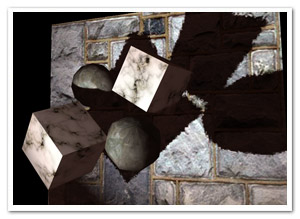
Metaballs are probably the most iconic example of isosurfaces out there (bar MRI and CT imagery). It was actually my test data for the MC system, but it ended up making a sneaky appearance in the demo (which I still consider a tribute to the undisputed king of ActionScript sticky substances ).

> Metaball demo (click to change textures)

Quaternion Julia Set

Another example I did was to triangulate a quaternion Julia set, which seems pretty popular lately ;) It definitely looks better raytraced, but I couldn’t resist! I’m using the distance estimator function to produce the grid values (see here), and an epsilon distance as the surface’s isovalue. Since things always look less crap with music, I added some for a change.

> Quaternion Julia Set Demo (might take a while to load the mp3)

Source

The marching cubes thingy, as well as the metaballs example source is up for grabs at Google Code . Enjoy! If you make any surfaces with it, I’d love to see them :)

Leave a comment (6 comments)

A George divided against itself cannot stand!

Tags: , , ,

georgeFor over 3 years now, I’ve been employed as an “interaction developer” at Nascom, focused on – what else – developing for the Flash platform. Since some time, however, I’ve been growing increasingly restless. Introspection was unavoidable, leading to one resounding conclusion: it’s time for a change.

Fact is, what I found myself doing on a daily basis at work is not something I fully enjoy any more, and it was definitely not why I started programming a long time ago. This opposed to what I do in my free time, the result of which can be seen on this blog. Trying to do both has caused me doing little else than sit behind my computer screen, coding away for entire days. So, I’ve decided to leave Nascom to pursue a carreer as an independent developer starting mid-June. Focused on graphics programming, I can shift what I love to do to a healthier part of the day. Or at least, that’s the plan ;-)

It was great to be a part of Nascom and work alongside so many talented people. Both from a human and a technical perspective, I still believe it’s the best digital agency in Belgium. Thanks for having me, guys!

Leave a comment (10 comments)

All new normal map shaders in Away3D with Pixel Bender!

Tags: , , , , , , , , , , , , , ,

pixelshadingIt’s no secret that I like graphics. It’s the main reason why I play video games and it’s the main reason I got into programming. So obviously I was delighted to be invited and to join to the Away3D team last month. Inspired by my earlier Stok3d project (now on the backburner for a bit), I set off to create similar normal mapped pixel shaders, this time in full 3D. After some rough first patches (Stok3d was pretty simple since it only used DisplayObjects, flat planes), things have luckily shaped up, leading up to the first release!

The current state is a dot-release (3.4.2), so the exact implementation might still change while we’re working towards a shiny new 3.5.

The new shaders

So what is the difference with the previous shaders? Using Pixel Bender, the shading is calculated for every pixel in the texture, resulting in much more detailed and realistic lighting or reflections. Each shader requires an object-space normal map, which you can use to add detailed shading information without increasing the polycount of the mesh.

headshader

The shaders come in three flavors: environment map shaders, and single- and multi-pass shaders. Single-pass shaders take one PointLight3D and any AmbientLight3D on the scene to calculate the lighting, whereas multi-pass takes any number of lights of any type (AmbientLight3D, DirectionalLight3D, and AmbientLight3D). Important to note, tho, is that every light adds another pass and will be slower. Of course, if you’re only using 1 light, always use single pass.

Check out the following classes in Google Code:

  • DiffusePBMaterial: Single-pass, adds diffuse lighting to the texture
  • PhongPBMaterial: Single-pass, adds diffuse lighting and specular highlights, with support for specular maps
  • SpecularPBMaterial: Single-pass, adds only highlights – can be used in combination with Prefab3D’s prebaked lighting to create view-dependent specular highlights
  • DiffuseMultiPassMaterial: Diffuse shading with multiple light sources
  • PhongMultiPassMaterial: Phong shading with multiple light sources

Demosplaneshader

Enough explanations, time for some demos! Right-click to view source:

That’s it, enjoy! Feel free to drop by the mailing list for questions or read the official announcement! For now, I need to get some sleep before Flash on the Beach kicks off :)

Leave a comment (10 comments)

September! Speaking at Adobe User Group BE meeting

Tags: , , , ,

augbeThe summer holidays aren’t even over yet and September already seems like it’s going to be a great month! Apart from the fact that I’m going to Flash on the Beach, there’s also something for us Belgians that’s a bit closer to home: the annual Adobe User Group meeting & barbeque on September 12th! And as it happens, I’ll be speaking there alongside much more impressive names as Seb Lee-Delisle and Niqui Merret :)

What to expect? Here’s my session description:

“In his session, David will walk through some of the experiments and projects he has done over the past year while elaborating on the concepts behind them. Without getting too technical, he will explain his motives, his love affair with Pixel Bender and the big looming question: “Mmkay, but what’s the use?”. Using experimentation as the main thread, he will try to show how going off the beaten path can take you to sweet little places you didn’t expect, and finally, offer a sneak-peak at some of the more useful projects he ended up doing as a result.”

In short, since it’s my first public session, I figured I would give a bird’s view of my philosophy concerning after-work development, and show some cool things I have in the pipeline at the moment (so even if you follow this blog, there’ll be something new to look at ;) ).

Don’t forget to register here if you want to come (and gloat) – and if you do, I’ll see you there!

Leave a comment (1 comment)

Render Bender v0.1: optimizing my Flash+Pixel Bender workflow

Tags: , , , , ,

renderbenderOften, when I’m writing Pixel Bender content targeted for Flash Player, the original toolkit leaves something to be desired. Luckily, Joa Ebert created his PBDT plugin for Eclipse which was already a great step to streamline my workflow. Still, the lack of previewing would require switching back to the PB toolkit. And more often than not, that preview didn’t tell me much, as many of my PB projects consist of multiple filters that are dependent on eachother’s output.

Render Bender

So yesterday, I created Render Bender v0.1 (yes, that is some juvenile wordplay) strictly to suit my own needs, but it might just be useful for people out there with the same problem. It is designed to tackle the following issues:

  • Eliminate the need of writing much AS3 code for PB code that might not even work. Instead generating an easy “proof of concept” method.
  • Real Flash-based rendering (instead of simulated rendering of the toolkit, which does not expose runtime bugs)
  • Running a sequence of consecutive Shaders, which may be dependent of a previous Shader or a previous run of an iterative sequence
  • Easy integration with Eclipse and PBDT, without the need of switching applications.
  • Have an easy way of demoing pixel bender effects in development

Essentially, it’s just a Flex App/Component that you need to add to a project, which contains nothing else except for perhaps some interactivity handling necessary for your effect. This way, you can then add your kernels to this project and have them compiled with PBDT. All you need to do is to set up an xml file (once) defining the assets and the kernel sequence. After that, it’s simply a matter of running the project after editing a kernel.

The documentation is a bit sparse at this point, but along with the Demo.mxml source file, it should be pretty clear.

Get it!

In closing…

It’s in early stages, but it works for me :)  I’ll be glad to hear questions, suggestions or bugs. I’m not sure how much time I can invest at this point, but I do have some ideas for future development. At this point, it uses the default Flex skin (3 or 4, depends on your sdk) to minimize compile time. If someone wants to create a minimal fast skin, feel free! :)

Leave a comment (5 comments)

Stubborn and unexpected embedded font weight behaviour

Tags: , , , ,

fontweights

Potentially confusing post warning!

At my job, I often have to work with font embedding. Often, that just happens in Flash IDE as part of assets exported to a swc. Not only because it’s convenient sometimes, but also because I’ve found embedding through Actionscript behaves… well… strange occasionally, especially when using thin or extra light fonts. Just now in fact, I encountered an interesting situation in which this was definitely the case. The font in question is an extra light OpenType font.

I created a static class FontManager, that embeds all the necessary fonts for the project, and also provides a shortcut function to assign the fonts to a TextField. So the setup (let’s call it Setup A) was as follows:

  • ViewClass – _textField: TextField
  • FontManager [static] – Embedded fonts + setFontFormat(textField : TextField, fontFamily : String);

The embedding happened in the usual way. Straight away, the first problem was that the text was rendered too bold. Messing around with anti-aliasing didn’t help one but, until – randomly – it rendered correctly. Afterwards, I changed the GridFitType: back to bold! Oddly enough, reverting to the old “correct” version didn’t fix anything.

After some messing about, I decided to embed the font in the same class as the TextField (still using the shortcut function in the separate class). The new setup B:

  • ViewClass – _textField: TextField + Embedded font
  • FontManager [static] – setFontFormat(textField : TextField, fontFamily : String);

Now it was thinner than it had ever been! Actually, it was exactly how the font should be ;) When reverting back to Setup A to find out what happened, the text wasn’t rendered as bold anymore. A bit thicker, yes, but not nearly as much. See the inset image for a better comparison.

Funnily, I can’t actually reproduce the original bold version anymore! Some behaviours seem completely random, and some perhaps seem to be related to namespace issues (??).

I’m really confused about what’s going on; this way, it’s really hard to create some centralised form of font management in a font-heavy project. I’d be happy if anyone could shed some light on this issue (or non-issue after all?) :)

Leave a comment (8 comments)

MultiMania 2008

Tags: , ,

Belgium’s biggest web-development event (or how should I call it ;) ) is over again, and the countdown to next year’s edition has begun! And yes, that is just a screenshot from their site…

They had some big names this year, and some very good presentations. Starting out with Aral Balkan, who had lots of valid points and touched some interesting topics (such as the Google Apps engine). He also criticised the direction AS3 has taken – a Java wannabe – which is definately not something to be criticised in my eyes. Coming from a C/C++ background (granted, still in DOS-times), I always got annoyed with AS1 and 2 (I could give you plenty of reasons why) and when AS3 came out, I was finally relieved to have a real and logical OO-compliant language to work with. He also criticised frameworks such as PureMVC (actually, he reduced the whole concept of MVC to a buzzword), and showed us that you can seperate model, view and controller while still keeping a very clean and maintainable structure by just separating them in one source file and using comments… Of course, it was a single page example; I’d like to see a full-fledged application made in such a fashion, on which both several developers and designers are working… I’ve seen plenty of projects turned to rubble because of it. Nonetheless, it is true that the Flash platform has become less of a playground, and I’m hearing the complaint a lot from non-developers. In my eyes, it’s a sacrifice that needed to be made sooner or later. A programming language that invites crappy coding rather than discourages it (I’m sorry, but that’s how I feel about AS1+2), will eventually be less performant and buggy. Besides, a lot of the performance boost that AS3 got, is because of the change in language design (one of the most blatant examples: truly typed variables or classes are faster than generic objects). Then again, I guess the views on that evolution depend on who you are and what you want to do with a platform.
Anyway, enough of that rambling, back to MultiMania!

Wim Vanhenden, despite some technical difficulties, had a rather fun presentation, showing how Air can be used in combination with Flash rather than Flex, and how the Flash platform can be extended to do more interesting things. For example: communicating with Java-apps or DLL’s using socket connections, enabling us to do text-to-speech, use the Mac motion-sensor, and so on…

Stealing the show was Ralph Hauwert, who doesn’t seem to know the meaning of “impossible” ;) Pushing Flash to the limits, and then beyond with seemingly relative ease. His flying teapot was unbelievable! I could explain how it looked, but you’ll just have to see it; I hope he’ll have it on his blog sooner or later. Furthermore, he introduced his latest project called rePhlex. It looks like something to look forward to! In general, it was quite inspirational. The main lesson I got from it, was that there’s always a way and that limitations are just a challenge ;)

Last up was Mario Klingemann who needs no introduction. I’d already seen half of his presentation on Flash on the Beach ‘07, but the second half was all new to me. It’s always a joy to see him solving mathematical issues in an untraditional way; using *gasp* BitmapData! How he comes up with it, who knows, but it works ;) Finally, he demoed his modular image processing tool “Peacock” for Aviary, and tho it looked a bit confusing at times, it could produce some very cool results, that would take quite a bit of time to make in Photoshop:)

All in all, a good day! Hats off to Koen de Weggheleire! :D

Leave a comment (1 comment)

© 2009 Der Schmale – David Lenaerts’s blog. All Rights Reserved.

This blog is powered by Wordpress and Magatheme by Bryan Helmig.